Alternatives

Supademo alternatives for how-to videos

Supademo (supademo.com) built its product around an interactive click-through demo, and has since added a screen recorder, MP4 export and SOP guides, so the overlap with a video tool is wider than it was. People look for a Supademo alternative when the recording is the point rather than the replica — when the editing decisions should come from what was clicked, and when a narrated video and its written guide are the deliverable rather than a by-product of a demo.

Prefer the row-by-row version? stepvideo vs Supademo.

Before the list

First: should you actually leave Supademo?

Supademo is an interactive product demo tool. There are jobs it does better than anything below, and if you recognise yourself on the left, the cheapest alternative is the one you already have.

Stay with Supademo if…

  • You're doing top-of-funnel sales demos where letting a prospect click through themselves converts better than a video.
  • You want the demo embedded in a landing page as an interactive element.
  • You need to swap names, logos and data per prospect — Supademo lists AI text personalisation and AI data editing.
  • You want a demo-shaped free tier to start on; Supademo lists 5 demos free.

Look for an alternative if…

  • The audience needs to be taught a procedure they'll then do in the real product — watching beats clicking a replica.
  • The recording is the artifact, not a by-product: you want the take itself edited, rather than a replica assembled from captured screens.
  • You want the zooms and step boundaries decided from the clicks you made, rather than placed by hand afterwards.

The list

8 Supademo alternatives for how-to videos

Coming from Supademo, the gap has narrowed: you already have a recorder, an MP4 and an SOP export, so comparing feature checkboxes will tell you less than it used to. Read each card for where the editing decisions come from instead. If the answer you need is still 'a replica the prospect drives themselves', the tool you have is the category you need, and nothing below replaces it.

Ours first — it's our site — then the rest, closest to Supademo first. Every other card quotes that company's own pricing or product page as of 2 October 2026, and links to the row-by-row comparison it was written from.

Entry price and free tier of the 8 Supademo alternatives below, from each tool's card; competitor cells read from that company's own pages on 2 October 2026.
ToolEntry priceFree tier
stepvideoThis siteCreator $29/mo — 25 AI video minutes, no watermark, 3 seatsYes — a 10-day free trial with 5 AI minutes, no card, watermarked exports
ScribePro Team $17 a seat monthly ($13 yearly), five-seat minimum; Pro Personal $35 monthly ($25 yearly)Yes — Basic, free
GuiddePro $19 a creator a month billed annually, matching Creator's figure when billed monthly; Business $39 annually or $59 monthlyYes — up to 25 how-to videos
NavatticBase $500/mo and Growth $1,000/mo billed annually ($600 / $1,200 billed monthly), read 2 October 2026; Starter free, Startup and Enterprise on requestYes — Starter is free for everyone: 1 seat, 1 demo
ArcadeGrowth $50 per seat a month, or $42.50 per seat billed yearly, up to 10 seatsYes — 1 published demo, 1 published video, 200 AI credits/mo, watermarked
StorylaneStarter $50/mo ($40 billed yearly), 1 seat · Growth $625/mo ($500 yearly), 5 seatsYes — 1 seat, 1 published demo, unlimited views
LoomBusiness $18 and Business + AI $24 per user a month billed monthly; their page says annual saves up to 17%Yes — Starter, 25 videos, 5-minute recording cap
TangoPro for 3+ users $20 a user monthly ($15 annual); 1–2 users $26 monthly ($22 annual)Yes

01 · this site

stepvideo

stepvideo is an auto-editing how-to video tool for browser workflows.

Entry price
Creator $29/mo — 25 AI video minutes, no watermark, 3 seats
Free tier
Yes — a 10-day free trial with 5 AI minutes, no card, watermarked exports
How you capture
Chrome extension — records the tab you pick
AI voiceover written per step
Yes — a script per step, each one editable and re-voiced on its own
A written guide from the same take
Yes — numbered steps, each with its own screenshot from the recording
02

Scribe

Scribe is a step-by-step documentation tool.

Entry price
Pro Team $17 a seat monthly ($13 yearly), five-seat minimum; Pro Personal $35 monthly ($25 yearly)
Free tier
Yes — Basic, free
How you capture
Chrome extension, plus a desktop app on paid plans
AI voiceover written per step
Movie view plays a guide as video with an AI voiceover and a selectable voice, across all plans
A written guide from the same take
Yes — this is Scribe's core output, on all tiers including free
Listed here, not on Supademo's page
cut a mistake while you're still recording

Compared with Supademo as an alternative; cells read from Scribe's own pages on 2 October 2026.

03

Guidde

Guidde is an AI how-to video and documentation platform.

Entry price
Pro $19 a creator a month billed annually, matching Creator's figure when billed monthly; Business $39 annually or $59 monthly
Free tier
Yes — up to 25 how-to videos
How you capture
Chrome extension, plus a desktop app on Business
AI voiceover written per step
Record your own voiceover on every plan; AI text-to-voice and Magic Mic from Business
A written guide from the same take
Yes — step documentation alongside the video
Listed here, not on Supademo's page
dead time shortened without editing · AI avatars / talking heads · the editing rules published in public

Compared with Supademo as an alternative; cells read from Guidde's own pages on 2 October 2026.

04

Navattic

Navattic is an interactive product demo platform.

Entry price
Base $500/mo and Growth $1,000/mo billed annually ($600 / $1,200 billed monthly), read 2 October 2026; Starter free, Startup and Enterprise on request
Free tier
Yes — Starter is free for everyone: 1 seat, 1 demo
How you capture
Chrome extension capturing HTML, screenshots or video, plus Mac and Windows apps
AI voiceover written per step
AI voiceovers listed from Base on the pricing page; the docs put narrated demos at Growth or higher
A written guide from the same take
Exports a PDF with a screenshot and narration per step, or a numbered text list
Listed here, not on Supademo's page
AI avatars / talking heads

Compared with Supademo as an alternative; cells read from Navattic's own pages on 2 October 2026.

05

Arcade

Arcade is a demo tool now leading with AI-generated product videos.

Entry price
Growth $50 per seat a month, or $42.50 per seat billed yearly, up to 10 seats
Free tier
Yes — 1 published demo, 1 published video, 200 AI credits/mo, watermarked
How you capture
Chrome extension and desktop app, listed on every tier
AI voiceover written per step
AI voiceovers listed across all plans, including Free
A written guide from the same take
Step-by-step guides on Growth or higher, one image per step; their docs say video steps are not supported

Compared with Supademo as an alternative; cells read from Arcade's own pages on 2 October 2026.

06

Storylane

Storylane is an interactive product demo platform for sales teams.

Entry price
Starter $50/mo ($40 billed yearly), 1 seat · Growth $625/mo ($500 yearly), 5 seats
Free tier
Yes — 1 seat, 1 published demo, unlimited views
How you capture
Chrome extension, Mac and Windows apps, Figma plugin, and Media to Demo
AI voiceover written per step
AI Voiceovers listed from the free tier up
A written guide from the same take
A demo exports to PDF, Word, Markdown or copyable text, every plan
Listed here, not on Supademo's page
AI avatars / talking heads

Compared with Supademo as an alternative; cells read from Storylane's own pages on 2 October 2026.

07

Loom

Loom is an async video messaging tool.

Entry price
Business $18 and Business + AI $24 per user a month billed monthly; their page says annual saves up to 17%
Free tier
Yes — Starter, 25 videos, 5-minute recording cap
How you capture
Chrome extension and desktop app
AI voiceover written per step
A beta text-to-speech patches words back into your own recording; per-step narration is not listed
A written guide from the same take
AI workflows draft a step-by-step doc with screenshots from the transcript, on Business with AI
Listed here, not on Supademo's page
dead time shortened without editing · cut a mistake while you're still recording

Compared with Supademo as an alternative; cells read from Loom's own pages on 2 October 2026.

08

Tango

Tango is a step-by-step guide and in-app guidance tool.

Entry price
Pro for 3+ users $20 a user monthly ($15 annual); 1–2 users $26 monthly ($22 annual)
Free tier
Yes
How you capture
Chrome extension, plus a desktop app on paid plans
AI voiceover written per step
Optional AI narration generated from step titles and descriptions, two voices, in Video Embeds on Pro
A written guide from the same take
Yes — Tango's core output, with screenshots, across all plans

Compared with Supademo as an alternative; cells read from Tango's own pages on 2 October 2026.

A price or feature here out of date? Tell us and we'll re-check the source and fix the row.

If you are leaving Supademo

What does stepvideo do differently from Supademo?

stepvideo edits the recording itself into a narrated how-to video and writes a guide from it, where Supademo builds a demo the viewer clicks through. Zooms are placed from the clicks it recorded and dead time is sped through, so the video plays the same for every viewer. For prospects who should drive the product themselves, Supademo fits better.

What stepvideo does differently from Supademo, and where Supademo is the better choice, point by point; Supademo's side read from its own pages on 25 October 2026.
PointWhat stepvideo doesWhere Supademo is the better choice
What the viewer getsA rendered MP4 and a share page that plays it: the viewer watches a procedure they will then repeat in the real product.Supademo's demos are clicked through by the viewer, with branching, variables and end CTAs from Scale, which suits a buyer exploring at their own pace.
Zooms and pacingZooms of up to 1.8× are placed from the clicks the extension recorded, and stillness over 4s plays at up to 3×, before you open the editor.Supademo lists zoom and pan, video editing and video splitting on every plan, Free included, for a creator who would rather place each move by hand.
Voice and captionsA script for each step, written from what happened on screen and anything you said, read in an AI voice, with captions burned into the MP4, word by word in most languages.Supademo lists AI voiceovers and closed captions from Scale, and AI voice cloning on Growth, for narration in a cloned voice.
Guides and captureThe guide comes from the same recording as the video, a screenshot per step, as a PDF or under the video on its share page; capture runs through the Chrome extension.Supademo exports a demo as an SOP in PDF or PNG on every plan, and its Mac and Windows desktop apps, from Scale, capture software outside the browser.
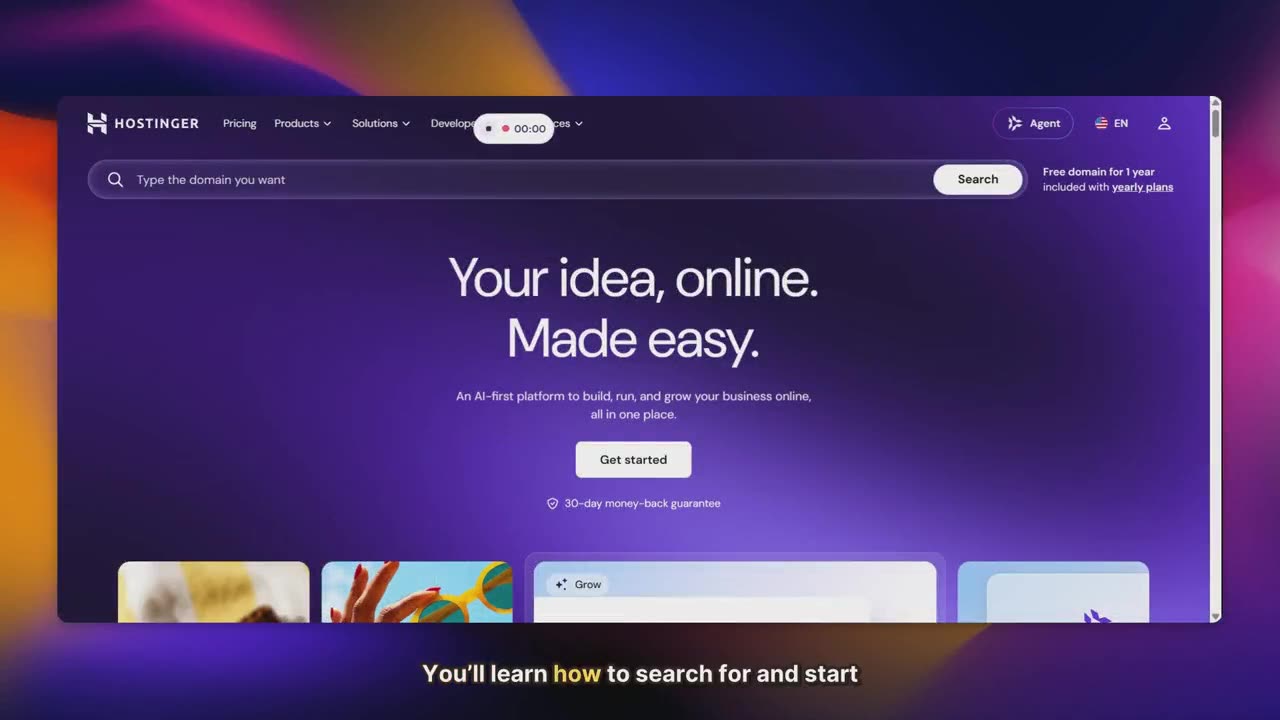
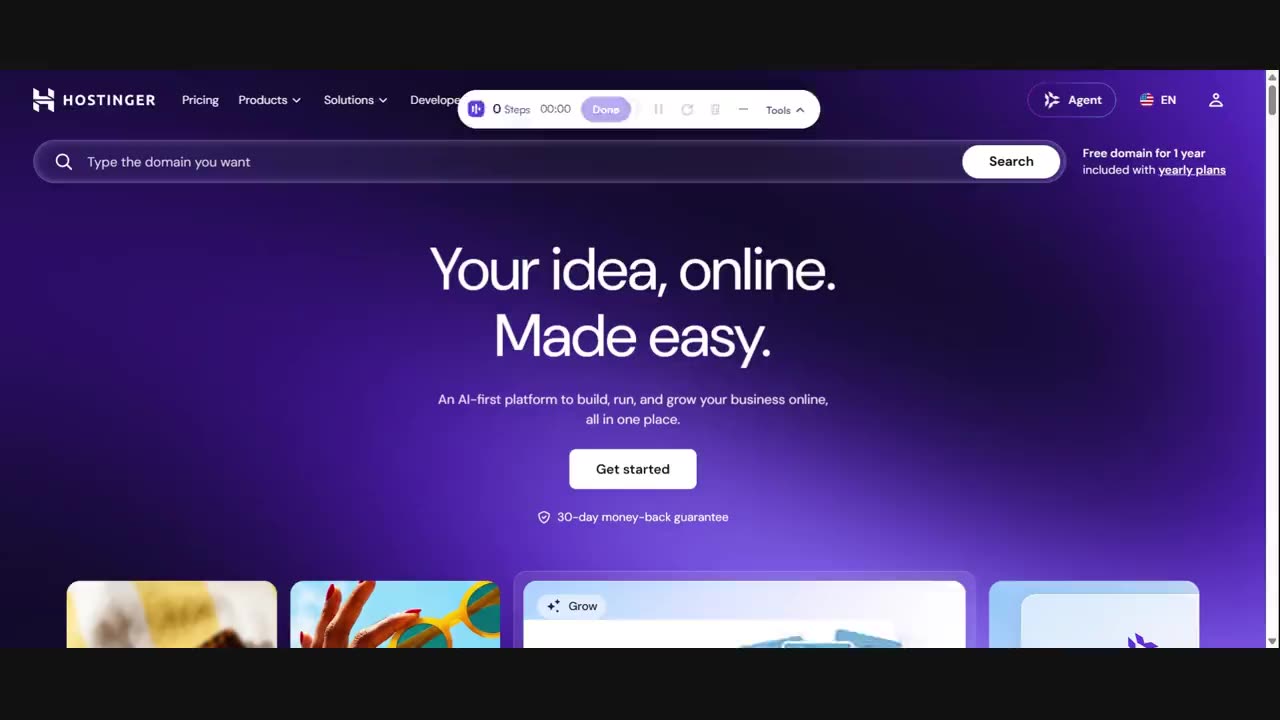
The raw recording's first frame: a hosting company's home page, unedited, with the recording controls at the top

Before · 2:07 as recorded

The same moment in the edited video: the page framed on a coloured background, with a burned-in caption along the bottom

After · 1:29 edited

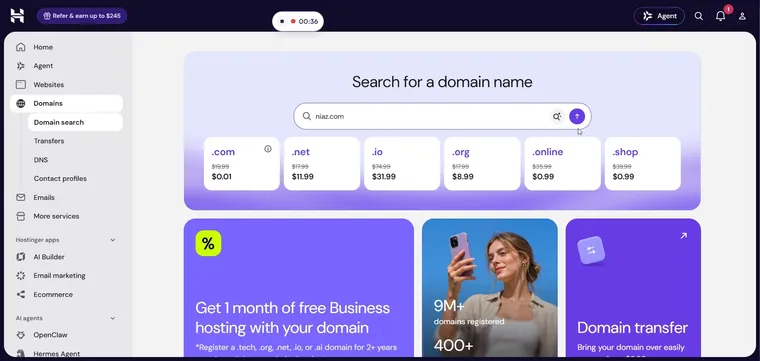
Written guide · step 5

Search for the Domain

Click the Search button to look up the domain.

Check: Search results for 'niaz.com' are displayed.

The domain search box reading niaz.com, with the pointer on the search button
This is a rendered video, not a replica: the before is the raw take, the after is that take edited, zoomed and narrated, and it plays the same way for every viewer. Before: the raw capture, 2:07 as recorded. After: the same take edited to 1:29, with zooms, voiceover and captions. The guide step is real output too, from a guide stepvideo wrote from a domain search recorded on the same site. Watch the before and after with sound

If you switch to stepvideo

Leaving Supademo: what you keep, what you gain, what you give up

The comparison table's rows, regrouped. Each group is read from Supademo's own pages on 2 October 2026 and from what stepvideo ships — and “doesn't list” means exactly that, not “can't”: the rows Supademo's page actually rules out get their own group.

Both Supademo and stepvideo list it

9 rows

  • Automatic zoom on the control you clicked
  • AI voiceover written per step
  • Word-by-word captions burned into the MP4
  • A written guide from the same take
  • Edit steps, not a timeline
  • A share page per render
  • Languages
  • Brand kit and branded share pages
  • Free tier

stepvideo has it; Supademo's page doesn't list it

3 rows

  • Dead time shortened without editing
  • Cut a mistake while you're still recording
  • The editing rules published in public

Supademo lists it; stepvideo doesn't have it

2 rows

  • Desktop app for non-browser software
  • Interactive click-through demos

Re-read 25 October 2026

What do Supademo's own pages list, as of 25 October 2026?

Quoted from Supademo's own pages on 25 October 2026, each line with the page it came from, and nothing scored. The comparison table and the cards keep the day they were read, 2 October 2026.

  • Free is listed as free forever for 1 creator, with 5 guided interactive demos, 50 video recordings in 4K and unlimited demo views; MP4 export on Free runs up to 1080p with a watermark. Supademo pricing
  • Scale is $50 per creator a month, or $38 billed yearly, and adds AI voiceovers, closed captions, AI translation, a custom domain, watermark removal and the Mac and Windows apps. Supademo pricing
  • Business is $249 a month, or $199 yearly, with 1 creator included and more at $50 a month; it adds guided HTML demos and AI data editing. Supademo pricing
  • Growth is $450 a month, or $350 yearly, with 5 creators bundled; it adds sandbox demos and AI voice cloning. Supademo pricing
  • Every plan exports a demo as an SOP in PDF or PNG; paid plans export MP4 up to 4K. Supademo pricing
  • Its FAQ offers a 14-day trial of the paid plans with no credit card, and an AI Demo Agent add-on on paid plans answers buyers by voice or text in 50+ languages, billed in prepaid credits. Supademo pricing

Questions

Leaving Supademo, answered plainly

I make interactive demos in Supademo. Should I switch at all?

Probably not for the demos. If the viewer's next action is to buy, a clickable replica they drive themselves is Supademo's whole product and a video won't beat it. Switch — or add — a tool like stepvideo when the viewer's next action is to do the thing themselves in software they already have: support, onboarding and training, where watching a narrated walkthrough teaches faster than clicking through a copy.

Can I embed a stepvideo the way I embed a Supademo?

You get a share page per render, public or unlisted by link, and the share pages are deliberately left frameable so they can sit inside a help-centre article; you also get the MP4 itself. What you don't get is an interactive element — the output is a rendered video, so it plays rather than responds.

Supademo lists five demos free. What does the stepvideo trial include?

There is a 10-day free trial with 5 AI minutes, no card, with recordings capped at 5 minutes and watermarked exports; the trial takes no card and nothing charges at the end of it — exports are watermarked and draft-quality until you pick a plan, and you can cancel before day 10 and pay nothing. After that, Creator is $29 a month for 25 AI video minutes. Supademo's page lists 5 demos and 1 creator free, and Scale at $50 per creator per month — if 5 minutes is not enough to start on, Supademo's free tier is the bigger one.

Does Supademo make videos as well as interactive demos?

Yes. Supademo's pricing page, read on 25 October 2026, lists 50 video recordings in 4K on the free plan and MP4 export on every plan, up to 1080p with a watermark on Free and up to 4K on paid plans. What differs with stepvideo is where the edit comes from: stepvideo places the zooms and speeds through dead time from the clicks it recorded, and writes and voices a script for each step.

How do Supademo's plans compare with stepvideo's?

Supademo prices per creator: its pricing page, read on 25 October 2026, lists Scale at $50 per creator a month ($38 yearly), Business at $249 a month ($199 yearly) with 1 creator, and Growth at $450 a month ($350 yearly) with 5. stepvideo prices the workspace: Creator is $29/month ($228/year) for 25 AI video minutes a month and 3 seats. Supademo's bill grows with the people who build demos; stepvideo's with the minutes of recording it edits.

Questions about Supademo itself — what its page lists, what it costs, where it wins — are answered on the row-by-row comparison. stepvideo vs Supademo: FAQ
Every price and feature on this page was read from each company's public pages on or after 15 August 2026.