
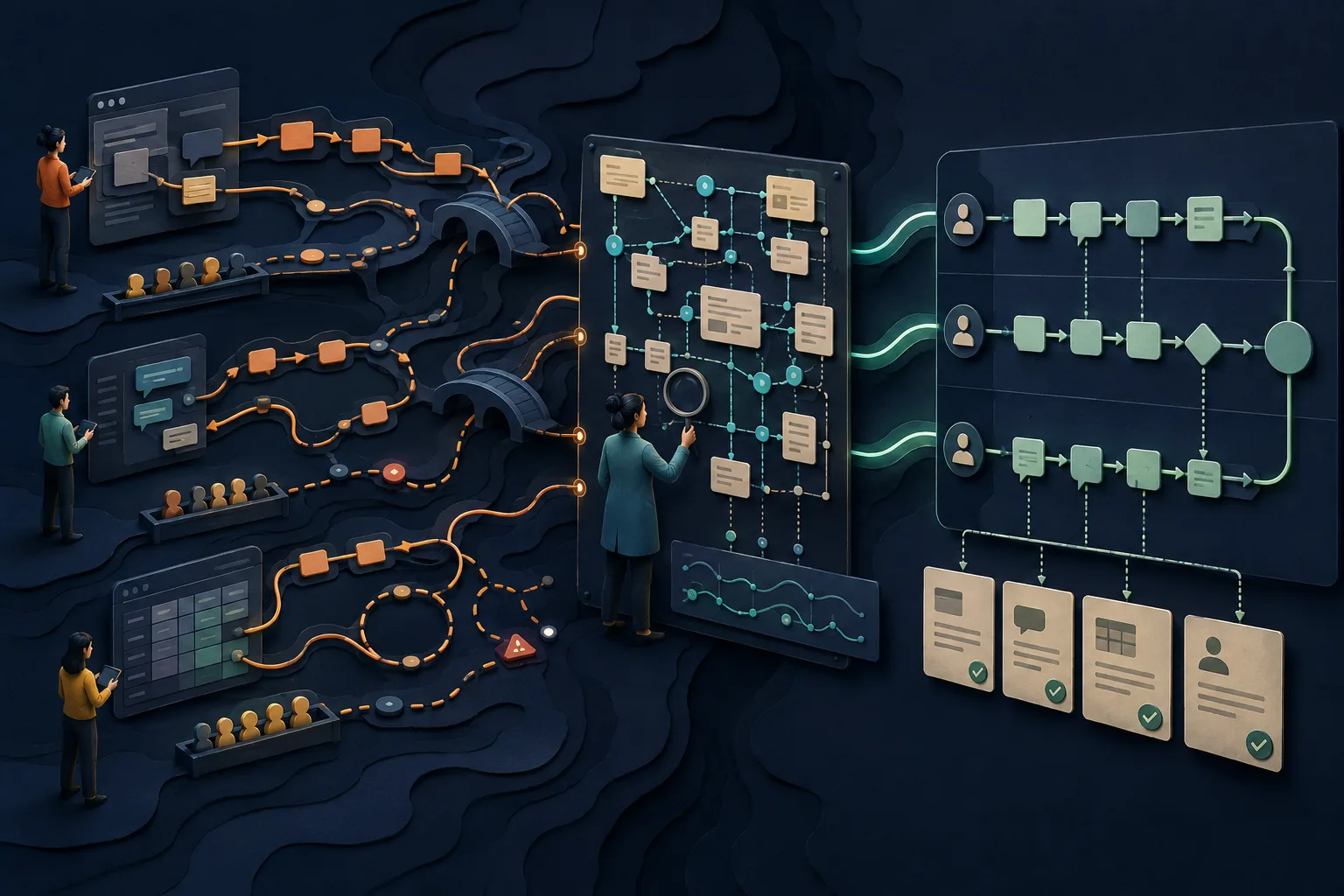
Most workflow documentation begins with a meeting and a blank diagram. Someone describes how work is supposed to move; boxes appear; the result looks orderly. Then a real case arrives through an unlisted channel, waits in a private queue, crosses three browser tabs, and depends on a message from the one person who knows the exception. The diagram is not necessarily dishonest. It was built from memory at the wrong moment.
The central rule: keep observed and approved workflows separate
An as-observed workflow is evidence from one or more real cases: who acted, in which system, with what information, after how much waiting, and what happened next. An approved workflow is a design decision: the path the organization wants people to follow. Improvement requires both. If the team edits observations into the preferred story during capture, it loses the very friction and variation the exercise was meant to reveal.
| Layer | Purpose | Useful artifact | Question it answers |
|---|---|---|---|
| Evidence | Preserve what happened in real cases | Observation log, recording, timestamps, samples | What did people and systems actually do? |
| Model | Make movement and responsibility visible | Flowchart, swimlane, BPMN diagram | How does work cross roles, decisions, and boundaries? |
| Instruction | Help a person perform one task | Steps, screenshots, video, checklist | Exactly how do I complete this activity? |
| Execution record | Prove or coordinate a particular run | Ticket, workflow instance, approval, audit event | What happened to this case, and who owns it now? |
The Object Management Group describes Business Process Model and Notation as a graphical notation intended to be understandable to business users while representing complex process semantics for technical users. That makes formal notation valuable when precision and shared modeling language matter. A small team can begin with a simple swimlane. The notation should match the decision, not become the project.
What to capture while work is happening
Do not transcribe every motion into an undifferentiated list. Capture the moments that change state, ownership, eligibility, risk, or information. A person copying a reference number between systems may be a task detail; the fact that the second system cannot receive the record automatically may be the workflow finding. Resolution matters.
| Field | Capture | Why it matters |
|---|---|---|
| Trigger | Event, request, schedule, threshold, or state | Defines when this workflow—not a neighboring one—begins |
| Input | Required information, object, permission, or evidence | Exposes work that starts incomplete |
| Actor | Role performing or deciding, plus backup if relevant | Makes ownership and concentration risk visible |
| System | Application, inbox, sheet, channel, phone, or paper | Reveals context switching and shadow systems |
| Action | Meaningful state-changing activity | Shows work rather than every cursor movement |
| Decision | Question, rule source, possible branches, authority | Prevents judgment from hiding inside a generic verb |
| Handoff | Sender, receiver, payload, channel, acceptance signal | Finds ambiguity between ‘sent’ and ‘owned’ |
| Waiting | Queue start, end, reason, service expectation | Separates touch time from elapsed time |
| Exception | Unexpected condition, workaround, escalation, recovery | Preserves the cases that make the official path fail |
| Outcome | Observable end state and downstream recipient | Lets reviewers distinguish activity from completion |
The three-pass method for documenting a workflow
- 1
Frame one outcome, not a department
Choose a bounded flow such as ‘resolve an eligible billing correction’ rather than ‘document Finance.’ State the starting trigger, intended outcome, customer or internal recipient, and exclusions.
- 2
Select varied real cases
Include at least one ordinary case, one exception, and—when risk permits—one case handled by a different person, channel, customer type, or system state. Remove or synthesize sensitive data.
- 3
Observe without coaching
Ask the worker to proceed normally and think aloud about decisions. Do not repair the process during observation. Record timestamps, system changes, unofficial tools, interruptions, searches, questions, waiting, and rework.
- 4
Build the evidence log
For each meaningful event, note actor, system, input, action, output, next owner, and uncertainty. Link recordings or screenshots to the event rather than pasting every frame into the map.
- 5
Interview after the case
Ask why the worker chose that path, what would change the decision, where the rule comes from, which cases are different, and what they do when the normal system fails. Separate explanation from what was directly observed.
- 6
Compare cases and roles
Mark stable steps, legitimate variants, personal preferences, policy violations, missing controls, and unresolved disagreements. Do not vote on truth; locate the authoritative owner or source for consequential rules.
- 7
Draw the as-observed model
Create lanes for real owners, show start and end, state-changing actions, decisions, handoffs, queues, rework, and exceptions. Keep evidence references attached so a reviewer can challenge each claim.
- 8
Design the approved workflow
Decide what to preserve, remove, standardize, automate, control, or test. Record why the approved model differs from observations and who accepts the operational consequences.
- 9
Link task-level instructions
For activities that need detailed performance guidance, link a separate guide, video, checklist, or system help page. Keep the map legible enough to show flow and the instruction concrete enough to do the work.
- 10
Pilot and instrument it
Run new cases through the approved model. Measure elapsed time, touch time, queue age, first-pass success, rework, exception frequency, handoff rejection, and outcome quality appropriate to the workflow.
- 11
Publish ownership and change rules
Name the workflow owner, local task owners, effective date, canonical location, review triggers, and feedback route. Remove superseded maps and redirect old links when possible.
How to observe without changing the behavior
Observation changes people. An employee may slow down, avoid shortcuts, or perform the official version because a manager is watching. Reduce the distortion by explaining that the workflow—not the individual—is under study. Observe routine cases in the normal environment, keep leaders out of the room when appropriate, and compare recordings with system records or artifacts rather than treating one demonstration as universal.
- Ask ‘what usually happens next?’ before ‘what should happen next?’
- Write uncertainty explicitly: observed once, reported by worker, inferred from artifact, or confirmed by policy owner.
- Capture abandoned paths and searches; they often reveal poor findability or missing system feedback.
- Record wait states even when nothing moves on screen; most elapsed time can live between visible actions.
- Interview upstream and downstream roles separately before reconciling their accounts.
- Never frame a workaround as misconduct without understanding why the designed path failed the worker.
Worked example: a customer access request
Imagine the stated workflow is simple: Customer Success submits an access request, Security approves it, and Operations provisions the account. Observation reveals something else. Requests arrive by form and direct message. Missing contract identifiers are repaired in chat. Security reviews a spreadsheet twice daily. Operations copies the approved row into an admin portal, then sends a confirmation that Customer Success sometimes misses.
| Observed event | Workflow signal | Question before redesign |
|---|---|---|
| Direct-message request | Uncontrolled alternate trigger | Why is the form bypassed, and must urgent work have a sanctioned path? |
| Contract ID requested in chat | Incomplete input and rework | Can submission validate the identifier or retrieve it automatically? |
| Spreadsheet checked twice daily | Hidden queue and batch policy | Is delay intentional, capacity-driven, or merely habitual? |
| Manual portal entry | Task detail plus transcription risk | Can systems integrate, or should verification remain human? |
| Confirmation missed | Handoff lacks acceptance | What signal establishes that Customer Success owns the completed result? |
The approved model might enforce one validated intake, define an urgent exception, replace the private spreadsheet queue with a visible state, and require acknowledgement of completion. Or it might preserve manual verification because the risk justifies it. Documentation does not choose automatically; it makes the tradeoffs and evidence discussable.
Choose the artifact by resolution
Slack's workflow documentation guide explicitly recognizes step-by-step guides, flowcharts, videos, annotated visuals, and knowledge bases as different documentation forms. Use that plurality. A cross-functional reader needs a map of ownership and decisions. The operator at one activity may need a screenshot guide. The reviewer investigating a defect may need a recording and timestamps.
| Audience need | Primary artifact | Linked support |
|---|---|---|
| Understand the end-to-end system | Swimlane or BPMN model | Definitions, measures, evidence log |
| Perform one browser task | Video plus written steps | Prerequisites, exceptions, escalation |
| Follow one case through controls | Executable checklist or workflow | Policy and task instructions |
| Investigate variation or failure | Observation evidence | System logs, recordings, samples, interviews |
| Learn a role | Curated training path | Maps, procedures, practice, feedback |
Where capture software helps—and where it stops
Scribe says it automatically captures how work gets done and turns institutional knowledge into context for teams and AI tools. Tango describes recording a workflow and generating step-by-step guidance with screenshots, highlights, and descriptions. These products can reduce the labor of preserving a performed software path. They do not, by capture alone, reveal every queue, policy source, offline conversation, alternative case, or downstream outcome.
stepvideo captures a browser task as footage plus interaction evidence such as clicks, typing, navigation, scrolling, element geometry, and timing. It can turn that evidence into an edited tutorial video and written guide with per-step screenshots, narration, voiceover, and captions. Use it for detailed activities inside a larger workflow. It is not a process-mining engine, cross-system event-log analyzer, executable workflow platform, or BPMN modeler.
For a tool-category comparison, see best process documentation software. For a general documentation method that begins from scope and outcome, use how to document a process.
Workflow documentation best practices that keep it alive
- 1Publish one canonical model. Copies may be exported for use, but they should identify or link back to the controlled source.
- 2Put evidence beside claims. Attach the observation, artifact, policy source, or owner decision that supports consequential branches.
- 3Name ownership at two levels. One person owns the end-to-end outcome; task owners maintain detailed instructions and controls.
- 4Measure queues and rework. Counting documented steps does not reveal where cases wait, bounce, or fail acceptance.
- 5Provide a feedback route in context. Workers need a way to flag a broken instruction at the moment they encounter it.
- 6Trigger review from reality. System releases, policy changes, incidents, metric shifts, new exceptions, and role changes should reopen the model.
- 7Archive visibly. Retired documentation should not look current, and required historical records should remain governed according to policy.
A reusable workflow documentation template
Use this compact structure for the canonical overview: workflow name and version; purpose and recipient; trigger and exclusions; start and end states; inputs; roles and decision authority; systems and channels; approved map; linked task instructions; exception and escalation routes; controls and required evidence; measures; owner; effective date; review triggers; change history; and feedback route. Keep the observation log separate and link it as supporting evidence.
The template is intentionally silent about diagram shape. Choose a simple lane-and-decision map when it communicates enough. Use formal BPMN when stakeholders need its standardized semantics. A template succeeds when a new participant can understand the outcome, locate their responsibility, follow the linked instruction, and know what to do when reality departs from the normal path. For the linked task-level procedures, the free SOP template gives each one the same structure.
Frequently asked questions
What is workflow documentation?
Workflow documentation records how work moves from a defined trigger to an outcome across people, systems, decisions, handoffs, queues, and exceptions. It may include an end-to-end map, linked task instructions, observation evidence, controls, measures, ownership, and change history rather than one all-purpose flowchart.
How do you document a workflow as it happens?
Select varied real cases, obtain appropriate authorization, and observe workers without coaching. Record meaningful actions, actors, systems, inputs, decisions, handoffs, waiting, exceptions, and outcomes. Interview participants afterward, compare cases, preserve uncertainty, draw an as-observed model, then separately design and approve the intended workflow.
What should a workflow documentation template include?
Include purpose, trigger, exclusions, starting and ending states, inputs, roles, decision authority, systems, channels, an approved map, linked task instructions, exceptions, escalations, controls, evidence, measures, owners, status, effective date, review triggers, change history, and a feedback route. Keep raw observation evidence linked but separate.
What is the difference between workflow documentation and an SOP?
Workflow documentation usually emphasizes movement across roles, systems, decisions, and handoffs from start to outcome. An SOP defines an approved way to perform an operation, often at greater task detail. A workflow map can link to several SOPs or guides, while an SOP can participate in multiple workflows.
Should workflow documentation use a flowchart, video, or written steps?
Use a flowchart or BPMN model for end-to-end structure, video for motion and timing, written steps for scanning and exact reference, and an executable workflow when individual runs need coordination or proof. Link complementary artifacts instead of forcing every resolution and audience into one overloaded document.
Can workflow documentation software discover the real process automatically?
Capture and process-mining tools can preserve or analyze valuable evidence, but no single source reveals the entire organizational workflow. Browser recordings miss offline activity and some decisions; event logs miss undocumented judgment and context. Reconcile multiple cases, systems, artifacts, roles, policy sources, and exceptions with accountable owners.